Hi everyone!
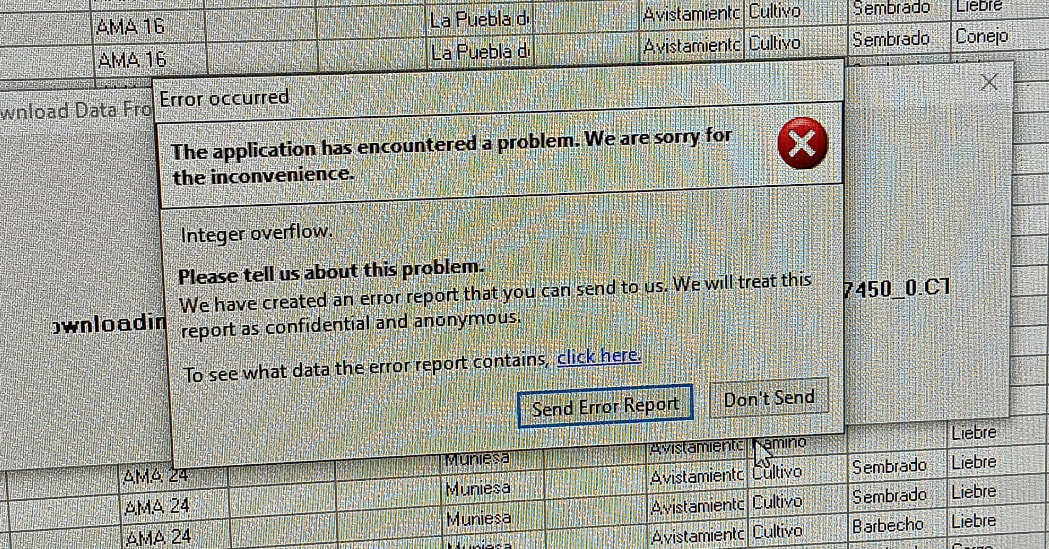
I’m having some issues downloading the data on the PC. When I download the data from web (5 files) it only shows 1 file. I tried to upload from the backup but “Error ocurred” shows inmediately. Finally I tried to download again a the “Error ocurred” window shows again. Any help?
Cheers!
Hi Marta,
This should be fixed in the latest version of desktop:
Thanks
Hi Justin,
I have the same problem as last time. The difference is that, when I download 15 files, I can`t see any on reports, I’ve installed the last version but I’m still having that problem.
Any idea?
Cheers,
Could you please check that the date range allows your data through?
If you have multiple databases that you have copied, then downloading from one will eclipse the other. Can you confirm that this did not happen?
You can also look in the Documents\CyberTracker\System\Backup folder for the CTX files that were downloaded. They can be opened and imported individually to see what is in them.
Cheers,
-Justin
Hi!
I have checked everything and it’s fine. I have tried to import the CTX files from the backup folder but I can’t see the imported reports.
Cheers,
If you just open the backup CTX files directly, i.e. not through import, do they contain any data?
Hi
Mine seems a little peculiar.
I just returned from the field and found some new changes in my cybertracker app. Before now when i open the cybertracker and i tap on the black round shade at the left corner down the screen, it opens to menu. I can click sighting and all the data collected for that trip displays. after Patrol, i can just export and download into my PC hassle free. sometimes i don’t even get to finish patron until i am back home and its usually not a problem. Today, i tapped on the black round shade like i usually do and it was different. The sighting showed nothing except the data for finish patrol. i exported the data and tried to download, but only the Finish Patrol was downloaded. i went to my archive data and tried to share the data into my email for extracting and importing, only the Finish patrol data coordinate was there. I created a backup file and tried to restore backup, it showed backup successful, still i could not find the data when i opened manage back up. though i can see my data under the data tab after project, before map. But i cannot find it for download or import. Please what is wrong and what can i do next?